Scan it, crave it, order it.

Cartia is a QR digital menu: your menu, with photos, on every table’s QR code. Guests see it on their phone, order and call the server, without downloading anything.

From $399 a month, Mexican VAT included. Coming soon to the U.S. Works with the POS you already use, or with Restozen.

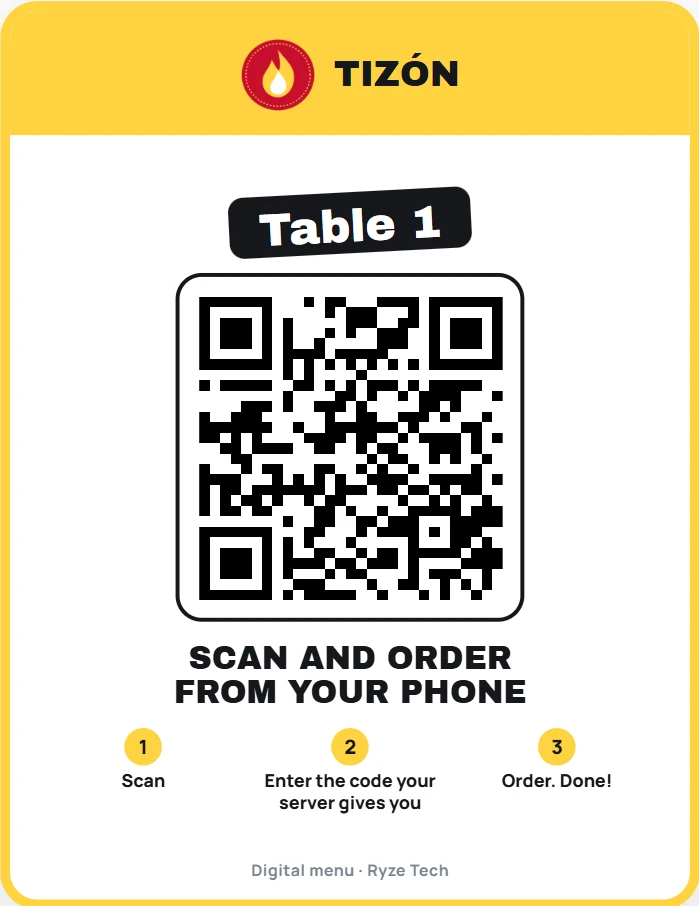
The table card for table 1 with its QR and the steps: scan, enter the code your server gives you and order.
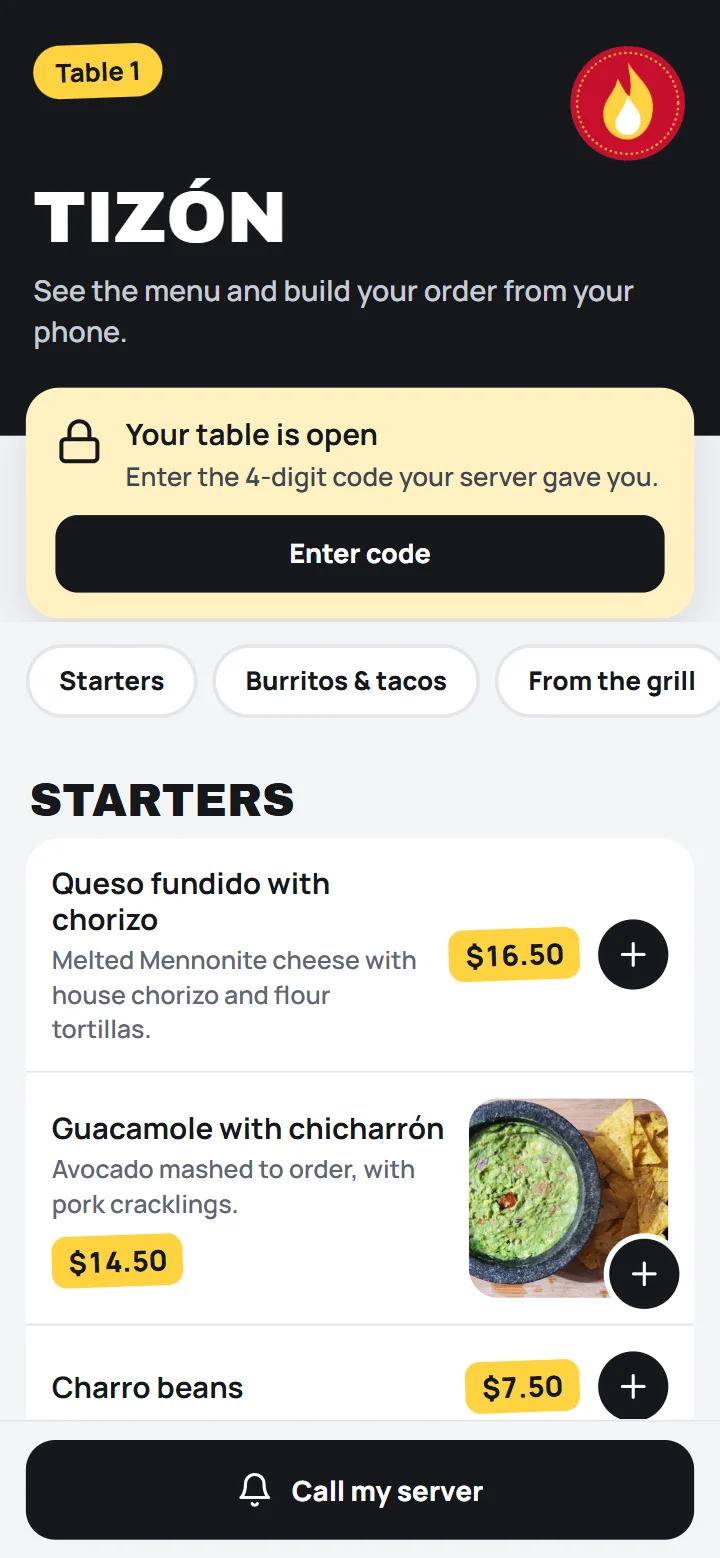
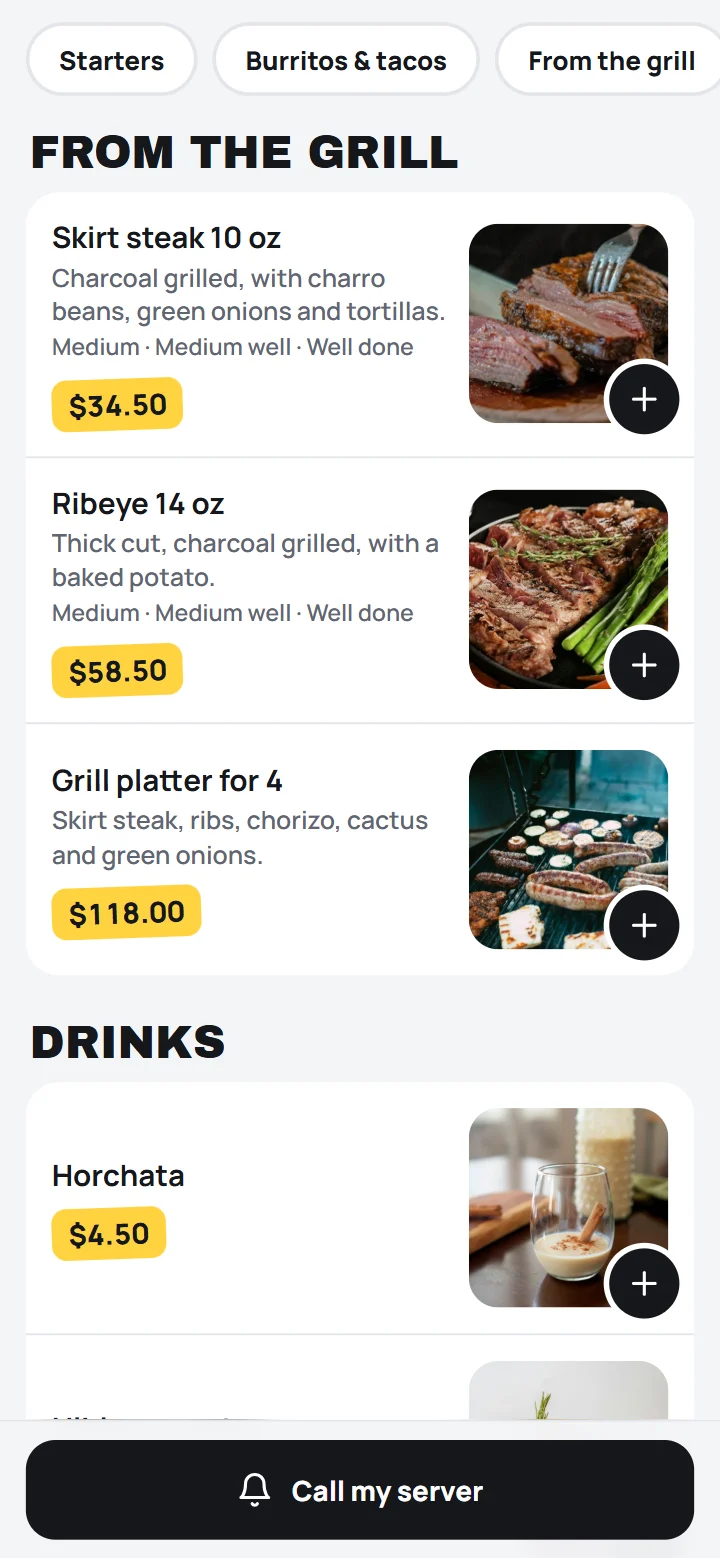
A restaurant’s menu on a guest’s phone: skirt steak, rib eye and mixed grill with their photos and prices.

From the table to the kitchen, in four taps.

Your guest sits down, scans and sees your menu on their phone. Your team gets the order and sends it to the kitchen. Turn the page.

1

They scan their table’s QR.

With their phone’s camera. Nothing to download, no sign-up.

  • Table cards ready to print, 4 per sheet
  • Light or dark, in 6 colors or your own, with your logo
  • Each table’s QR never changes: print it once
  • Rather not scan? Leave a tablet with your menu at the table
Light table card with table 1’s QR.
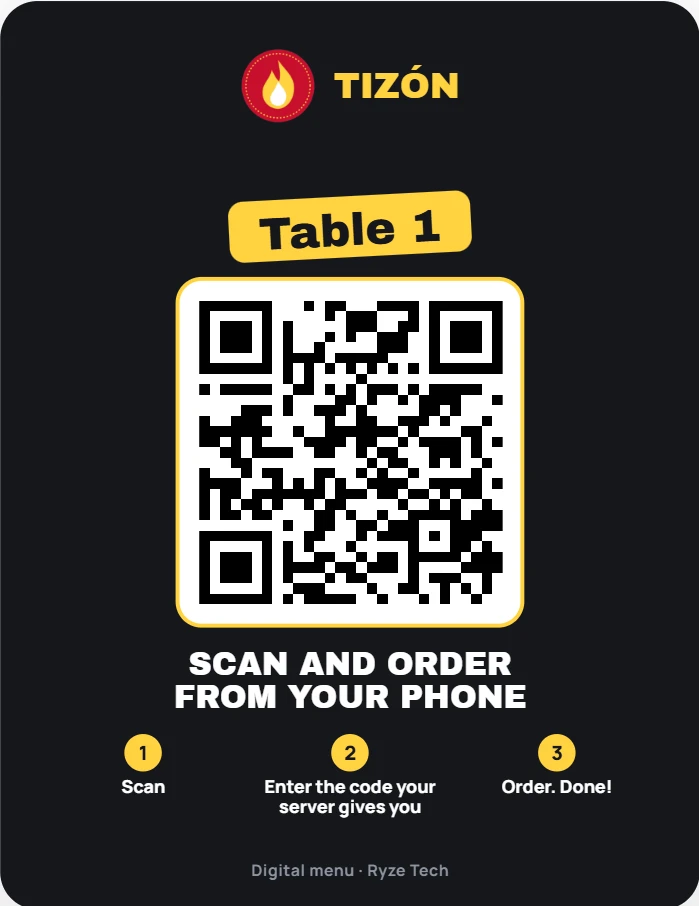
Dark table card with table 1’s QR.
2

They see your menu with photos and crave it.

Every dish with its photo, description and price.

  • Tap the photo to see it big
  • Choose doneness, size or flavors
  • "Want us to leave anything off?" and a note for the kitchen
  • Filter by vegan or gluten-free and see allergens
The top of the guest menu with the restaurant’s name, the categories and the first dishes.
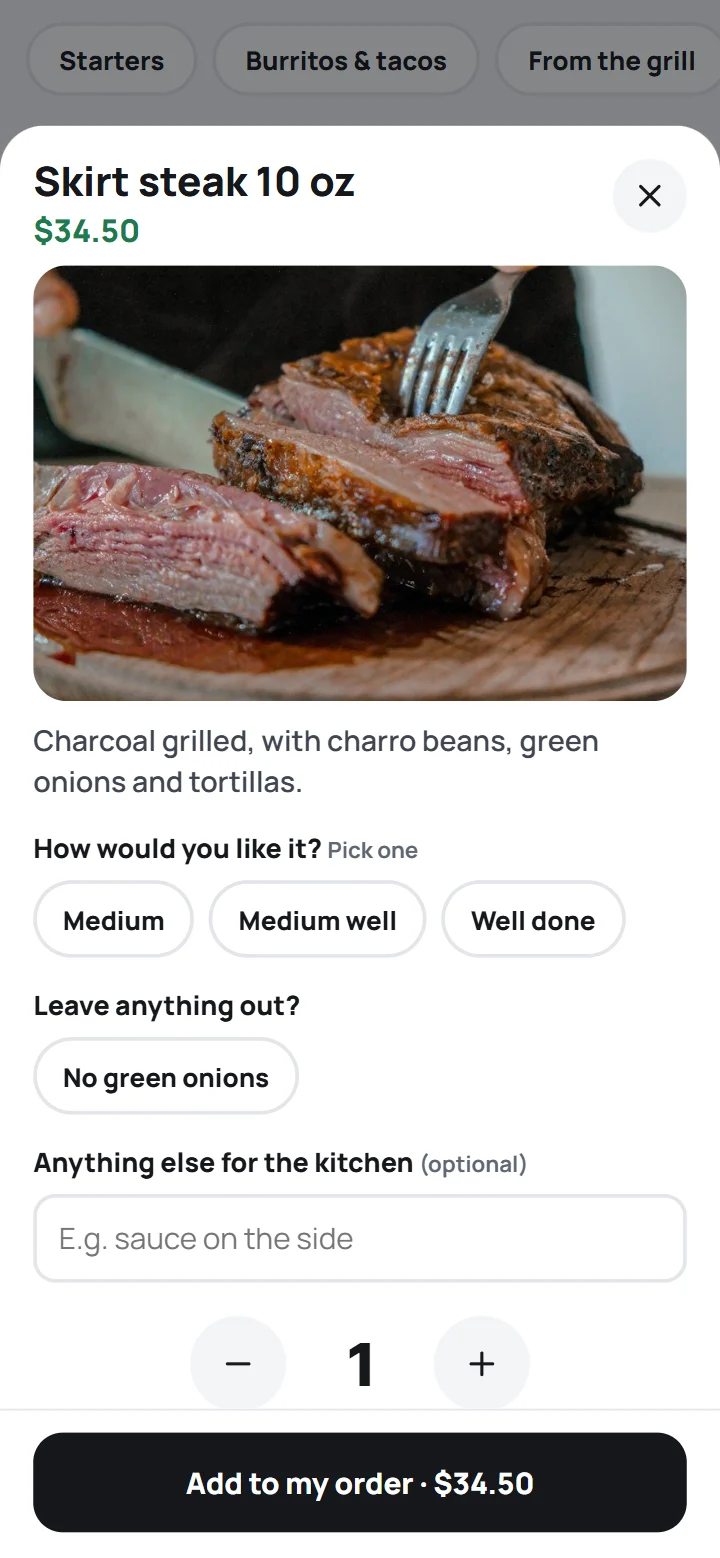
The skirt steak, big, with its photo, the doneness to choose and what to leave off.
3

They build their order and send it.

Each visit gets its own link: once the table is closed, people who left can’t order anymore. And if the restaurant uses the server’s 4-digit code, nobody can order from outside.

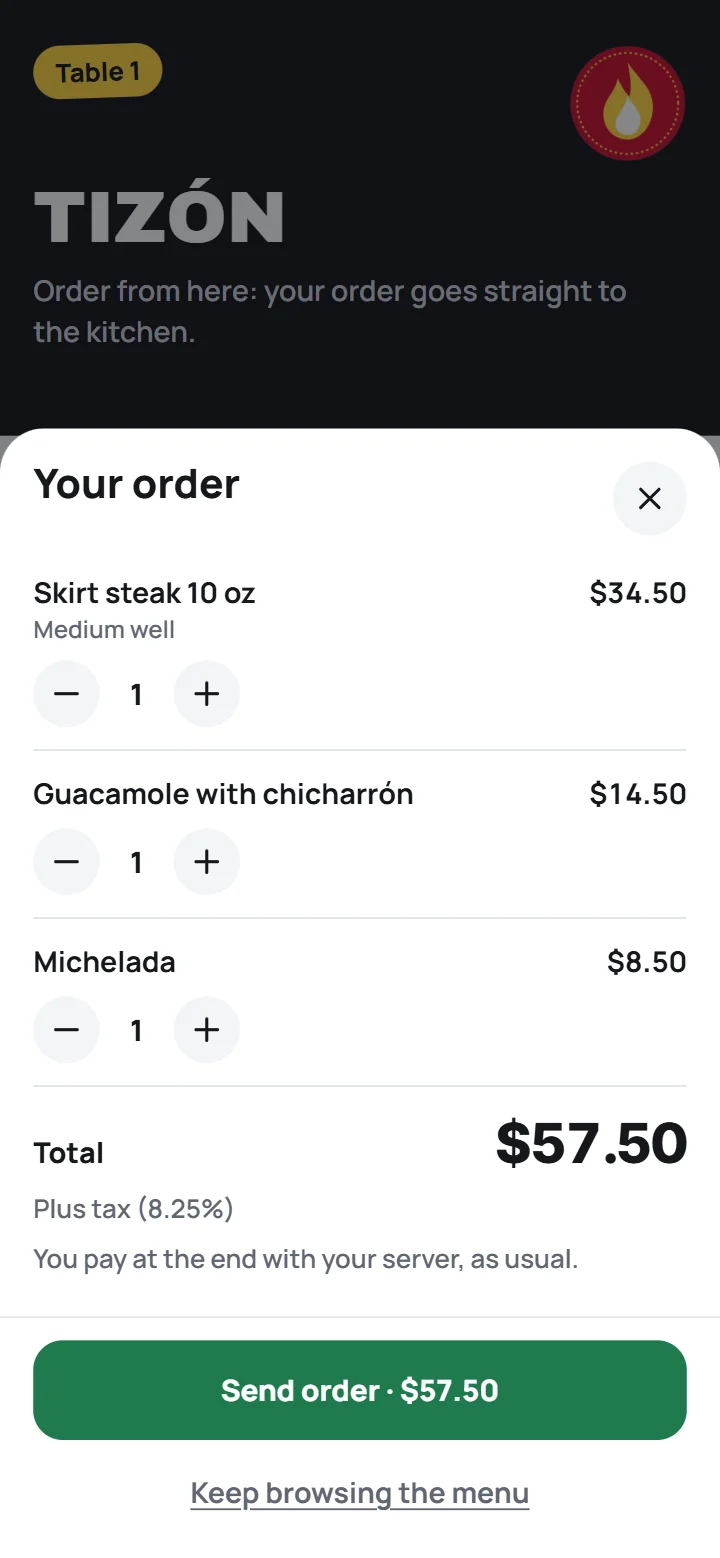
  • They see their order and the total before sending it
  • "Would you like to add…?": you suggest what goes well with their dish
  • They see how their order is going: in the kitchen, being made or on its way
  • They pay their server at the end, as always
The order: a medium-well skirt steak, guacamole and a michelada, with the $57.50 total and the Send order button.
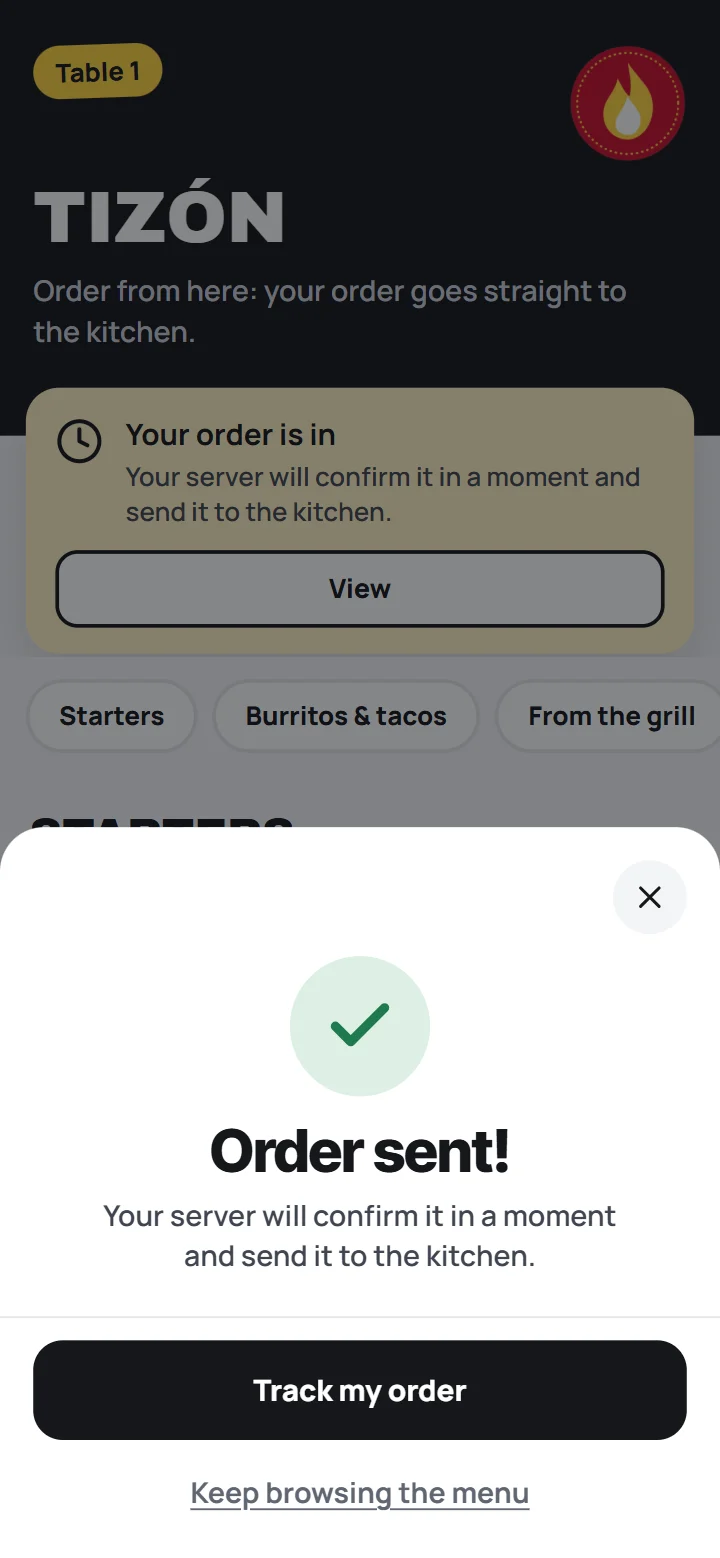
Order sent! Your server confirms it in a moment and sends it to the kitchen.
4

Your team gets it on its own.

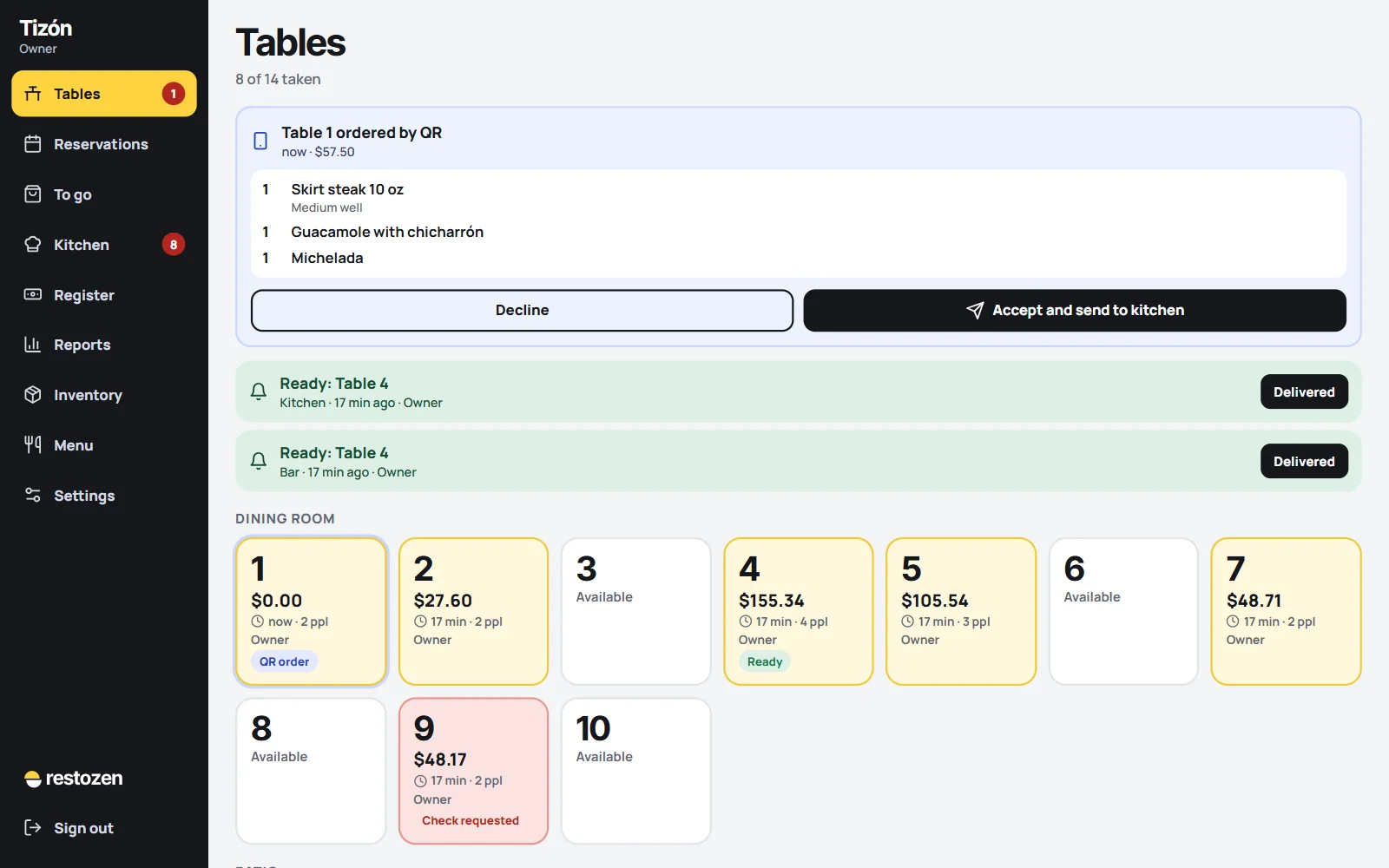
It chimes and shows "Table 1 ordered by QR". Your server accepts it and it goes to the kitchen screen.

  • You decide what needs confirming: the first order, all of them or none
  • Big orders are always confirmed by your team
  • Call the server and ask for the check, with one button
The tables screen with the alert Table 1 ordered by QR, what they ordered and the buttons Decline and Accept and send to kitchen.

Every restaurant, its own menu.

Dark or light, 6 colors or your own, 7 fonts and your logo. Tap a kind of restaurant and watch it change.

These are the colors and fonts the system comes with. Your table cards come out in the same font and color.

And your team gets it on its own.

On the tablet, the computer or the server’s phone. With a sound, so nobody is left waiting.

  • "Table 1 ordered by QR", with what they ordered and the total
  • They accept it and it goes to the kitchen screen
  • "Calling the server" and "Asking for the check", with "On my way"

The Cartia menu.

Everything it includes, laid out like a menu.

For your guests

Photos of your dishesIncluded

Take them with your phone. Guests tap a photo to see it big.

Priced optionsIncluded

Doneness, size, flavors and add-ons: "Large +$2".

Leave ingredients offIncluded

"No onions" and a note for the kitchen. It shows in red so it isn’t missed.

Call the serverIncluded

One button and your team hears it. When they go, they tap "On my way".

Ask for the checkIncluded

Guests see their running total and ask for the check from their table.

Order for pickupIncluded

With Menu + ordering, guests order from your restaurant’s link and pay online with Mercado Pago (in Mexico) or at pickup. Your team gets it with a sound.

Google reviewIncluded

When their visit ends or they pick up their order, your customer sees "Leave us a review" with your Google link.

Menu in EnglishIncluded

You translate it and your guests tap English / Español on the menu.

Tablet menuIncluded

Instead of the QR, leave a tablet at the table. Guests see your menu there and, with Menu + ordering, they order, call their server and see their check. When the table closes, it goes back to the start on its own.

"Would you like to add…?"Included

With Menu + ordering, you pick up to 3 suggestions for each dish, shown to your guest when they order it. Reports show how much you sold that way.

Vegan, gluten-free and allergensIncluded

Vegan, vegetarian, gluten-free and spicy tags, plus each dish's allergens. Your guests filter the menu.

How their order is goingIncluded

With Menu + ordering, on their phone or the table tablet they see "In the kitchen", "Preparing" or "On its way!".

Pay from the phoneWith Complete

With Restozen, your guest pays the check by card from the table with Mercado Pago and can leave a tip.

Pay from the phoneComing soon

Guests pay their check by card from the table.

For your team

Straight to the kitchenIncluded

Accepted orders reach the kitchen screen, tagged QR.

A new link every visitIncluded

Once the table is closed, people who left can’t order, call the server or see the check.

Visit codeOptional

4 digits from the server, so nobody orders from outside the restaurant.

You decide what needs confirmingIncluded

The first order, all of them or none. Plus a limit: anything above it is confirmed by your team.

Sold out in one tapIncluded

If you run out, turn it off and it disappears from the menu right away.

Works with your POSIncluded

With Menu + ordering, table and pickup orders reach you in Cartia with a sound and go to the kitchen. You ring them up on your usual POS and tap "Delivered" in Cartia.

For you

Your colors and logoIncluded

Dark or light, 6 colors or your own, 7 fonts and your logo on top.

Your menu from ExcelIncluded

Upload it from a file or dish by dish. Change prices whenever you want.

Menu by time of dayIncluded

Breakfast only from 8 to 12, or a happy hour: outside its hours it does not show on the menu and cannot be ordered.

Your menu from a photoIncluded

Upload a photo of your paper menu and we build the list with its dishes, prices and sizes, so you just check it before uploading.

Table cards with your QRIncluded

Print them, 4 per letter sheet, or download them as images for your print shop.

The QR never changesIncluded

Even when you change your menu or prices, every table’s QR keeps working.

Menu on a TVIncluded

Your menu on a screen in your restaurant: it cycles through your categories with photos and prices, in your colors.

Automatic Fidelo stampsIncluded

If your guest has a Fidelo card, their stamp is added when the table is closed.

Don’t see what you need? Ask for it: what restaurants ask for is what we build first.

Choose how you want it.

Mexican VAT included. Pay for the year and you only pay for 10 months. Try it free for 14 days.

Coming soon to the United States

Cartia already runs in Mexico and we’re getting everything ready to open in the United States. Message us and we’ll let you know as soon as it’s ready.

Let me know

The first 5 restaurants pay half the setup fee.

Menu only

Your menu with photos on every table’s QR.

$399a month

Optional setup $1,500 if you want us to set it up

No setup fee

Try it free
Most popular

Menu + ordering

Guests order from their phone, at the table or for pickup, and it reaches your team.

$999a month

Optional setup $3,500 if you want us to set it up

No setup fee

Try it free

Complete

With Restozen

Cartia with Restozen, our restaurant POS.

$1,599a month

No setup fee

Try it free
What each one includes
What it includesMenu onlyMenu + orderingComplete
Your menu with photos, descriptions and prices
Your colors, font and logo
A button to call the server
Table cards with each table’s QR
Change prices and sold-outs instantly
Menu in English for your guests
Menu on a TV
A tablet menu at the table instead of the QR
Tags (vegan, gluten-free, spicy) and allergens, with a filter
Menu by time of day: breakfast, happy hour
Your menu from a photo of your paper menu: we build the list and you just check it
Several locations in one account
Guests order from their phone
Orders reach your team and the kitchen
Ask for the check from the table
"Would you like to add…?": suggestions when ordering, and how much you sold that way
Guests see how their order is going: in the kitchen, being made or on its way
A new link every visit, optional code, and you decide what needs confirming
Fidelo stamps when the table is closed
Pickup orders from your restaurant’s link
Google review button when the visit ends
Your guest pays by card from the table (Mercado Pago)
Charge with your Mercado Pago Point terminal: the amount goes over on its own, no typing
Restozen: tables, kitchen tickets, payments and end-of-day close
Manager approves with their PIN; reopen checks and refunds
Reports and recipe-based inventory
Delivery with your own drivers, and reservations
Keeps selling offline
Win back guests who have not come back, with your WhatsApp

Fidelo costs less with Cartia

Loyalty cards on your customers’ phones. It comes with Menu + ordering or Complete, it’s optional and paid once per business.

Basic$699$499
Business$1,099$799
Pro$1,499$1,099

Already have a POS?

With Menu only or Menu + ordering you keep the POS you already use. With ordering, your team gets the orders in Cartia and you ring them up on your usual register.

With Menu + ordering, Cartia adds the Fidelo stamp for your guest when the table is closed.

Want to switch POS? The Complete plan includes Restozen.

VAT includedPrices in US dollarsWhat you see is what you pay.Billed monthly or yearly.
No appsYour guests just scan.
Daily backupEncrypted, every day.
Made in Chihuahua, MexicoSupport on WhatsApp, in English and Spanish.

What you’re wondering.

Do my guests need to download anything?

No. They scan their table’s QR with their phone’s camera and the menu opens, on iPhone and Android.

What if my guest would rather not use their phone?

Leave a tablet at the table with your menu. Guests browse it and, with Menu + ordering, order, call their server and see their check, no QR or code. When the table closes, the tablet goes back to the start on its own, and leaving the menu takes a PIN from someone on your team. To keep it from switching to another app, use Guided Access on iPad or App pinning on Android.

Are the team screens in English?

Yes. The screens your team uses are in English, and each person can use English or Spanish. Your guests see your menu in English, and you can add a Spanish version for guests who prefer it. Prices are in dollars, with your sales tax shown apart.

What if someone orders from home?

At the table, each visit gets its own link: once the table is closed, people who left can’t order anymore. If you turn on the server’s 4-digit code, nobody can order from outside the restaurant. Without the code it’s faster, but anyone who scans while the table is open can order, so it’s best for your team to confirm each table’s first order. For pickup, yes, even from home: with Menu + ordering or Complete, guests order from your restaurant’s link and pay online (in Mexico) or when they pick it up. You accept it with the ready time, and if you decline it, the payment is refunded automatically.

If I change my menu, do I need to reprint the QR codes?

No. Each table’s QR is fixed: print it once and it works forever. You change dishes, photos and prices whenever you want and they show right away.

I already use another POS. Can I still use this?

Yes. With Menu only or Menu + ordering you keep your POS. With ordering, orders reach your team in Cartia and you ring them up on your register as always. Upload your menu from Excel or a photo and try it free for 14 days.

Can my menu be in English?

Yes. In the "Menú en inglés" screen you write the translation, and your guests see an English / Español button on the menu. The kitchen still gets it in Spanish.

Can I have a breakfast menu or a happy hour?

Yes. You give each category its days and hours, like breakfast from 8 to 12. Outside its hours it does not show on the menu and cannot be ordered. For a happy hour, make a category with its own prices and hours.

Can guests pay from their phone?

With the Complete plan, they pay their check by card from the table with Mercado Pago and leave a tip if they want. With Menu + ordering or Complete, pickup orders can be paid online too. The money goes straight to your Mercado Pago account. Mercado Pago charges its fee (about 3.5% + $4 + VAT) and Ryze charges nothing. At the table, with Menu only or Menu + ordering, they pay their server as always.

Can guests pay from their phone?

Not yet: they pay their server at the end, as always. They can ask for the check from the table. Paying by card from the phone is coming soon.

What hardware do I need?

Nothing new. To receive orders, your team uses the tablet, computer or phone they already have, in the browser. For table cards, any printer or a print shop.

Do you charge a setup fee?

No. In the U.S. there’s no setup fee: we get it ready for you remotely. We upload your menu with photos, descriptions and prices, add your colors, font and logo, give you the QR cards for every table ready to print, and show you how to use it on a video call.

How does the free trial work?

You sign up with the plan you want and use it free for 14 days. We ask for your card when you sign up, but the first charge is on day 15; if you cancel before, you pay nothing. One trial per person.

Is the setup required?

No. With your free trial you can build your menu yourself, from Excel, from a photo of your paper menu or dish by dish, and get your QR codes. If you’d rather have us set it up, it’s a one-time payment. With Menu only, for $1,500, we upload your menu with photos, descriptions and prices, add your colors, font and logo, give you the QR cards for every table ready to print, and show you how to change prices and sold-outs. Menu + ordering, for $3,500, includes all of that, plus we add your tables, set up your team’s screens and train your servers and kitchen to receive orders. Printing the cards is up to you. The first 5 restaurants pay half, and the Complete plan, with Restozen, has no setup fee.

What if I have more than one location?

All your locations stay in one account: you copy the menu and logo to the new one and get into each with the same email. Each location has its own QR codes and pays its own plan; every extra location pays 25% less: Menu only $299, Menu + ordering $749 and Complete $1,199 a month. If it uses the same menu, its setup is half price.

I already have Restozen. How much is Cartia?

With Restozen, Cartia comes in the Complete plan: $1,599 a month for both, with no setup fee. QR orders reach your team in Restozen and go into the table’s check.

How much is the yearly plan?

You pay for 10 months and use 12: Menu only $3,990, Menu + ordering $9,990 and Complete $15,990 a year.

Make your menu irresistible.

Message us and we’ll show you Cartia working with your restaurant’s menu.

Tap the +
Table 4

YOUR RESTAURANT

Browse the menu and build your order on your phone.

Desserts and drinks

Cajeta flanHomemade, with pecans.$70
MicheladaWith Clamato and chamoy.$85
Order sent!Your server confirms it and sends it to the kitchen.

Questions? Just ask.

We answer on WhatsApp, in English and Spanish.

I have a question
Help
Try it free for 14 days